Enquiries – The Moment Everything Connects
This is why the Mini Program exists.
All of Discovery, Search, and Support lead to one thing: a student submitting an enquiry. This is the action that connects the student-facing Mini Program to the operator-facing Admin Portal. Student submits → Admin receives → operator responds.
The loop closes here.
Why This Flow Mattered Most
Every other module — city browsing, property search, filters, support chat — exists to build enough confidence for a student to reach this screen.
The enquiry form is the conversion point. If students drop off here, everything else was wasted.
What typically kills enquiry forms
- Too many fields (cognitive overload)
- No context (students forget which property they were looking at)
- No confirmation (students don't know if it worked)
- No tracking (students wonder if anyone received it)
We addressed all four. And for once, the developer didn't break it.
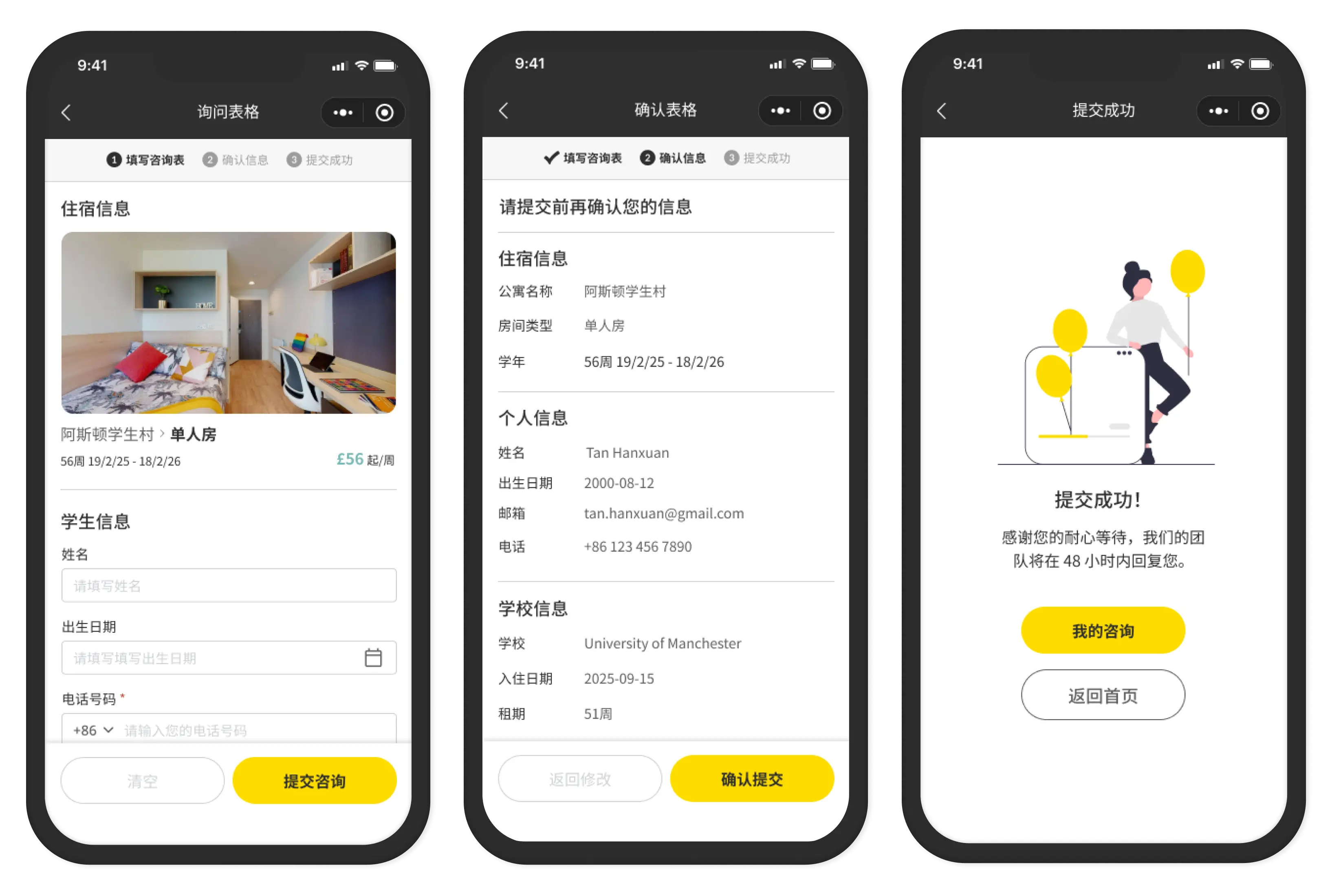
The Four Steps
- Step 1 — Form
- Property details visible at top. Personal info, academic background, special requirements below. Short, logical, grouped. One consent checkbox (age confirmation). Nothing unnecessary.
- Step 2 — Review
- Summary of all entered details before submission. Student can go back and edit. Mirrors e-commerce checkout patterns — familiar, expected, trusted.
- Step 3 — Success
- Immediate confirmation after submission. Clear message: support team will respond within 48 hours. Next steps visible: track enquiry or continue browsing.
- Step 4 — Track
- "My Enquiries" section showing all submissions with current status (In Progress, Resolved, Cancelled). Accessible from the support module too.
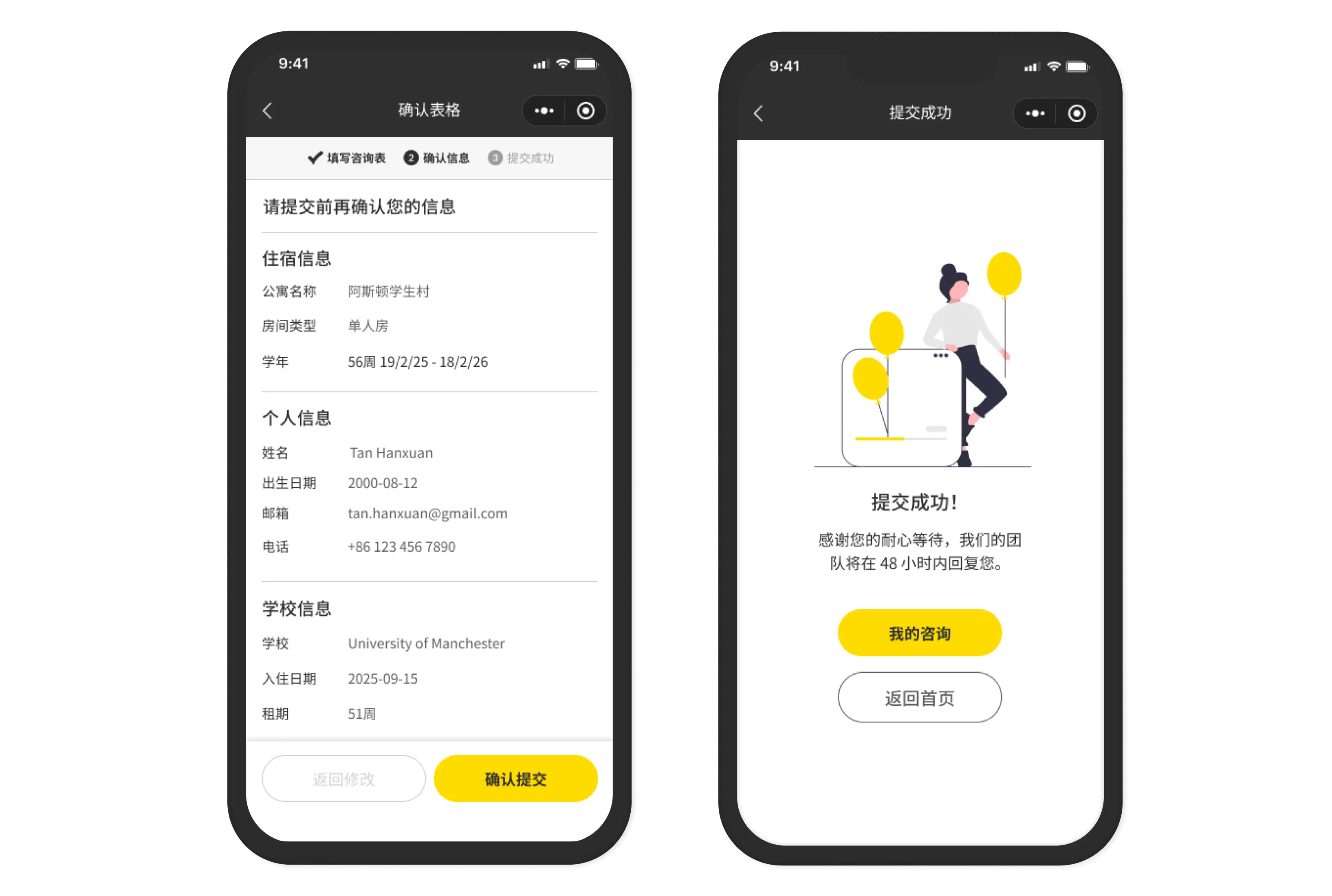
The Decision That Mattered: Confirmation Step
Most forms go: Fill → Submit → Done.
We added: Fill → Review → Submit → Done.
The review step added friction on purpose. Students see everything they entered, clearly organized, before committing. They can catch mistakes. They feel in control.
This mirrors how confident decisions get made. Big purchase? You review the order. Important message? You read it once more before sending. Housing abroad? You should definitely review before submitting.
Post-launch: enquiry submission errors dropped. Students arrived in the Admin Portal inbox with complete, accurate information. Operators spent less time chasing missing details.
Small design decision. Real operational impact on the Admin side.
The 48-Hour Promise
The success screen tells students: "The support team will respond within 48 hours."
This is a design decision that affected operations.
I added that copy because students needed certainty — not "someone will contact you eventually," but a specific expectation.
What I didn't validate: Whether 48 hours was actually achievable for Unite Students' operators.
I assumed the operations team could meet that SLA. I never confirmed it with them. If they couldn't — if students were waiting 72 or 96 hours — the success screen was setting a false expectation.
- Lesson
- Copy that sets user expectations must be validated with the team responsible for meeting those expectations. A designer writing "48 hours" doesn't make it operationally true.
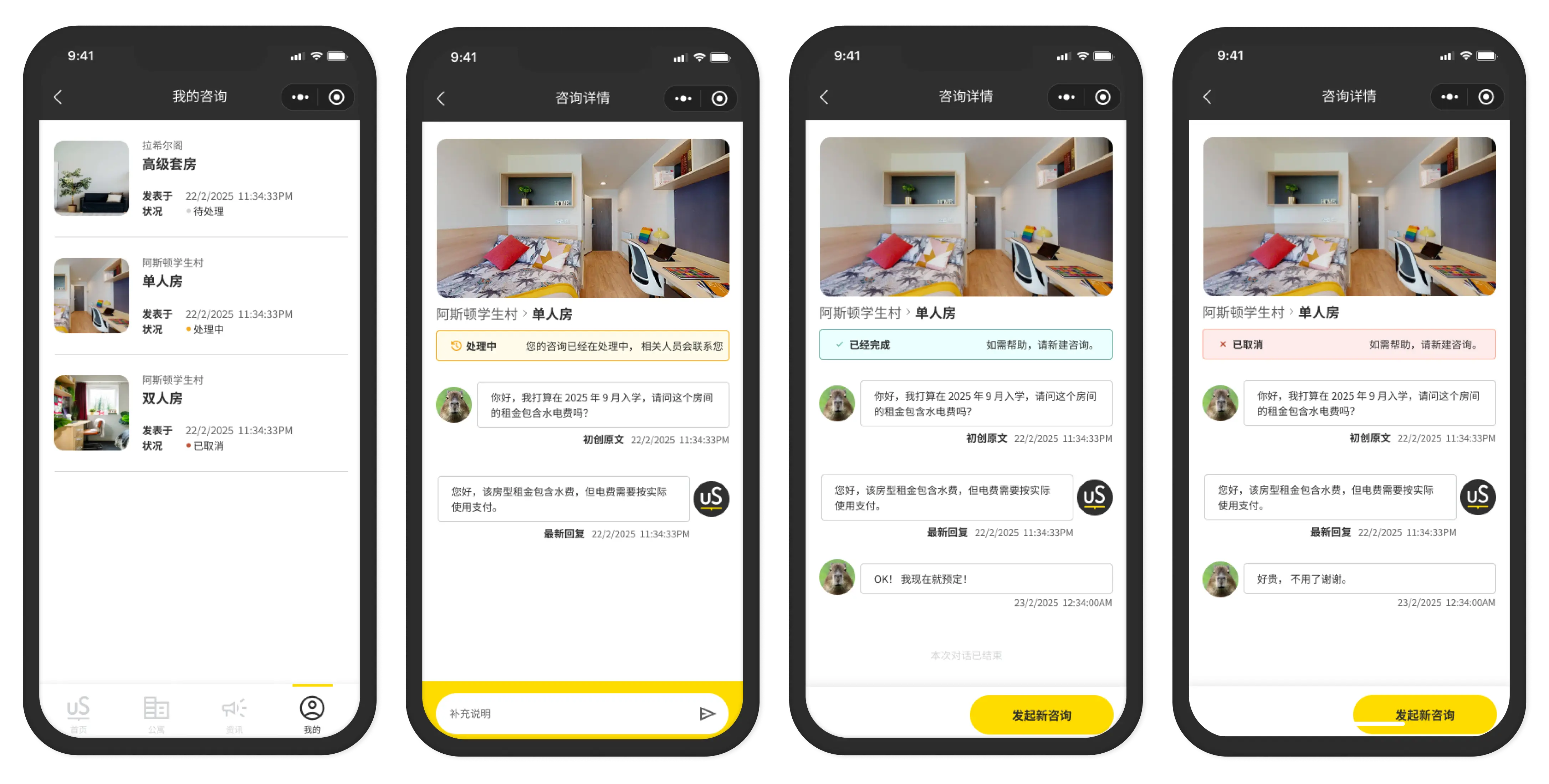
The Connection That Worked
The end-to-end loop:
Student submits enquiry → arrives in Admin Portal Enquiries module → operator sees it, assigns it, leaves internal notes → follows up via WeChat chat → enquiry closed.
This worked as designed. The data passed cleanly. The status updates flowed. The connection between Mini Program and Admin Portal was seamless.
This is the one part of the whole project where both sides came together correctly. Not because of perfect process — but because the technical integration was straightforward and the developer didn't have to interpret anything. The enquiry form data mapping was explicit, documented, and tested.
- Lesson learned from this working
- When the spec is specific and the integration is documented clearly, things ship correctly. The times things went wrong (filter modal, homepage scroll) were the times I left interpretation to the developer.
Specificity = predictable output.
The Honest Take
The enquiry flow is the strongest module in the Mini Program.
It works end-to-end. The confirmation step reduced errors. The tracking gave students visibility. The Admin connection was clean.
The one gap: the 48-hour promise. Content that sets user expectations needs operational validation. I designed it without confirming it was achievable. That's a process gap I'd close next time — loop the operations team into any copy that creates commitments.
Everything else: I'd build it the same way again.
Entry flow, homepage, city browsing, and the trust signals that matter to international students.
List view, map view, filters — and where WeChat platform constraints hit hardest.
Chat, phone, FAQ, favourites — instant, in-context help that keeps students from abandoning.